 termal
Features
The terminal you keep open all day.
Everything you expect from a modern SSH client — done properly and kept fast. SFTP, FTP, Telnet, S3, RDP and VNC and a database client too, a browser cabinet you can reach from any device, and an MCP server so your agents work through the same hosts, safely — plus a local terminal to launch your AI CLI right in a tab, and an AI assistant that summarizes sessions, explains output and writes the command you ask for.
Terminal
A fast, tabbed terminal
Real xterm-256color sessions with browser-style tabs, a hosts sidebar, snippets, and session restore with scrollback.
- Inline suggestions: start typing and the rest of the command appears — from your history on that host, the server’s own shell history and your snippets. → accepts, several matches open a picker.
- Rust core + tab hibernation — light on RAM, quick with a wall of hosts open for weeks.
- A status bar with live CPU, memory, disk, network and uptime for the box you're on.
Browser cabinet
Your terminal, in any browser
Sign in at termal.in/account and get a web SSH client from a laptop, phone or tablet — a real terminal, SFTP/FTP/S3 file browsers and recording replay, with no install.
- Private hosts stay reachable through the Termalin Connector, keyless — no key ever enters the browser.
- The browser terminal, file browsers and database client come with Pro and Team.
- Try the live demo →
Remote desktops · RDP / VNC
Windows desktops in a tab, next to SSH
Open a Windows desktop over RDP or any VNC desktop in a tab, right beside your terminals. Mouse, keyboard, Ctrl+Alt+Del and the clipboard both ways, with ⌘ mapped to the Windows key on a Mac. The certificate is pinned on first connect, before the password is sent.
- Direct connections are free — the app dials the desktop itself, our servers aren't involved.
- Reach one behind a firewall through a Connector, or open it in the browser — on Pro and Team, 4 open at once on Pro, 10 on Team. The stream is relayed in memory, never stored.
- On a desktop reached through a Connector on its own machine, a Files button browses that machine over the same tunnel — no key needed.
For agents · MCP
Built for your agents
A real MCP server for SSH over the hosts you choose. Your agent lists them and works through Termalin — two ways:
- It can open its own sessions and run there in the background — a glowing tab you can watch.
- Or step into a session you already have open and run alongside you, the border glowing while it acts.
- Key custodian: unlock once and Termalin signs on the agent's behalf — no
ssh-add, no key ever handed to the agent. - Or no app at all: connect ChatGPT, Claude, Claude Code, Codex or Cursor to the hosted MCP endpoint (sign in once, or use an API key) — 23 tools that run a command (or the same one on several servers at once), start background jobs, read or write files (SFTP), query databases, and read server metrics and open alerts, all on your tunnelled servers even when nothing's running on your machine.
- A built-in AI assistant, too — a session summary, "explain this" on a selection, a command from a plain request. See AI assistant, just below.
AI assistant
An assistant built into the terminal
A built-in assistant on the desktop, on iOS and in the web cabinet: it summarizes a session, explains a selection, turns a plain request into a command (Ctrl+Shift+K, or a ✦ key on phones) and describes a server for its AI note.
- Monthly requests: 400 on Pro, 1,000 on Team, 40 on the trial.
- Prefer your own model? On any plan, point it at your own Anthropic key or an OpenAI-compatible or local endpoint instead.
- It asks before the first request leaves your device.
- In the web terminal, an "explain" answer ends with read-only check commands — one button types them into the session, and nothing runs until you do.
Local terminal · AI workspace
Your agent CLI, in a tab
Open a shell on your own machine as a terminal tab — right beside your servers, not off in a separate window.
- Just type claude, gemini, codex or
claude --continue— it runs in the shell and drops you back at a prompt when it exits. Same on Windows, macOS and Linux. - Save it like any host: pick Local, set a shell and working directory, and it's one click from your sidebar.
SFTP
File browser & built-in editor
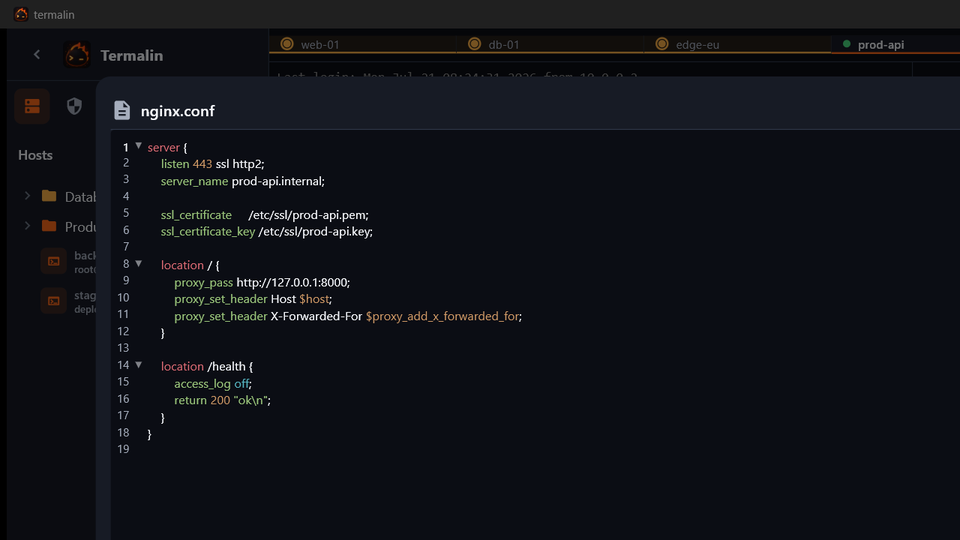
An SFTP client with a built-in editor: browse remote files and open them right here — no round-trip to a local copy.
- A real editor: syntax highlighting, search & replace, word wrap, in-place save.
- Open images, PDFs, Markdown, CSV and archives in place, not just code.
Data · database client
Your databases, in the same app
Open a database like any other host — a schema tree of every database, table and view (with row counts, columns, indexes, foreign keys and grants), a SQL editor and a structure view. No separate tool to launch.
- 13 engines: PostgreSQL, MySQL/MariaDB, SQLite, MongoDB, Redis, ClickHouse, Elasticsearch, Cassandra/ScyllaDB, Neo4j, InfluxDB, RabbitMQ, SQL Server and Cloudflare D1.
- Reach a public database directly, or one behind a firewall through a Connector — no exposed port, no tunnel to wire by hand. On the desktop, and in the browser cabinet on Pro and Team.
- Let an agent query it too — read-only by default, per-connection, over MCP.
- The database client, in depth →
Watch grid
Every session, side by side
Open as many hosts as you like — the watch grid mirrors them all at once, so you drive a change across a fleet and see each one respond.
- Every open session as a live tile.
- Sessions an agent is driving glow.
Recording
Record & replay any session
Turn on SSH session recording and play any session back later — commands, output and agent actions, on a scrubbable timeline with markers.
- Output only — never your keystrokes. Passwords at hidden prompts (sudo and friends) are never echoed, so they never land in the tape.
- Replay in the app or, on paid plans, from the web cabinet.
- Set a retention window — 7, 30, 90, 365 days or forever — and old recordings prune themselves.
Monitoring · Alerts
Server monitoring, with nothing to install
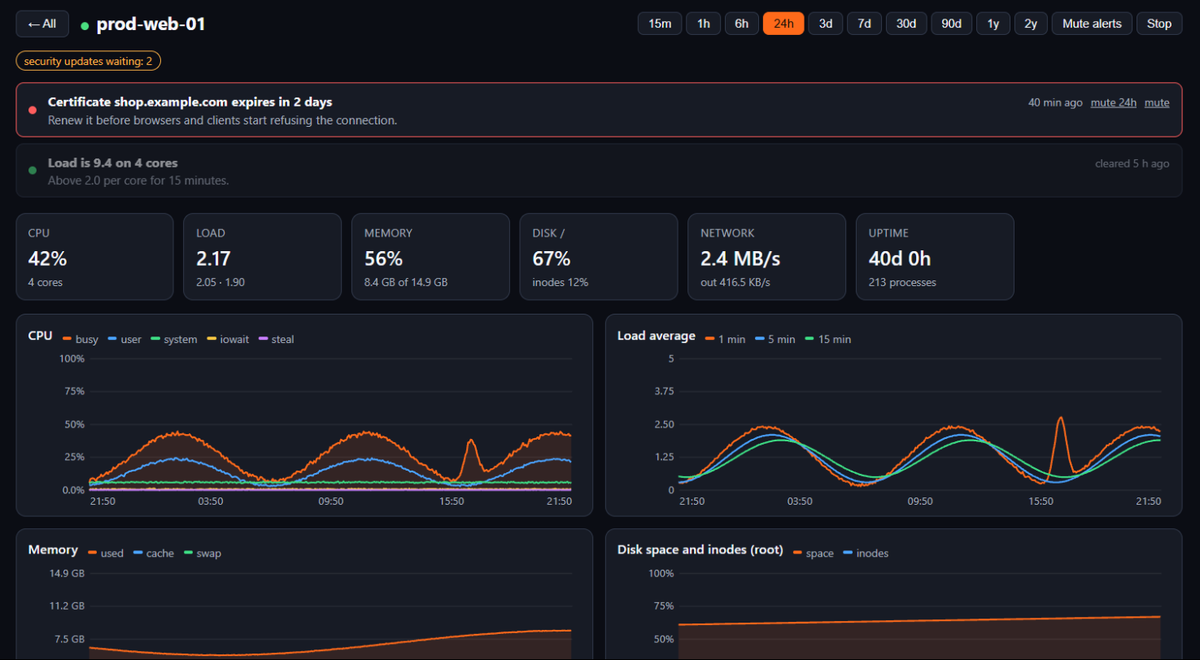
Server monitoring and alerts for every server that has a Connector. Once a minute Termalin runs a few read-only commands over the Connector's existing connection and draws the result in the web cabinet under Server metrics — and in the desktop app under Settings → Account → Monitoring, with an overview of every server and 1h / 24h / 7d charts. Connectors install with one line on Linux, Windows and macOS; on Windows the figures come from the built-in system queries.
- Dashboards: CPU, load, memory and swap, disk space and inodes, network, disk I/O, pressure (PSI), processes, containers, failed services, TLS certificates with days to expiry, listening ports.
- Linux, Windows and macOS. Windows and macOS servers report CPU, memory, disks, network, processes and uptime; pressure (PSI), containers and failed systemd services are Linux-only.
- Alerts with default thresholds — nothing to configure: disk nearly full or forecast to fill within a day, memory pinned, an out-of-memory kill, inodes nearly full, sustained high load, CPU taken by the host, a failed service, a container that keeps restarting, an expiring certificate, the clock out of sync, the server restarted or offline.
- Channels: email, push to the iOS app, Telegram (one click to link the bot), or a signed webhook that Slack and Discord accept as is.
- Quiet by design: one message when a problem opens and one when it clears. Mute one alert type on one server — or a whole server — for a day, or until you lift it.
- Thresholds are editable, so a box that runs hot by design doesn't nag you.
- Repeat is off by default; Tell me when a problem clears is on. After three messages in an hour the rest wait for a single summary, and an offline alert waits five minutes before it sends.
- History for 90 days on Pro and two years on Team. Claude and ChatGPT can read the same numbers and alerts over the hosted MCP endpoint.
Backups
Encrypted backups of your Linux servers
For every Connector on a Linux server: pick the folders, a schedule and how many copies to keep. Nothing is installed on the server — it packs the folders at the lowest CPU and disk priority, and Termalin reads the result at a capped speed (20 MB/s by default), so a backup never slows the server down. Server backups →
- Only you can open an archive. Each backup is encrypted in your account with a key made in the cabinet, its private half protected by your master password. Termalin stores ciphertext only; the cabinet decrypts an archive in the browser or the app and hands you a
.tar.gz. - Store them where you like — Termalin's cloud, your own S3-compatible bucket, or another of your servers that has a Connector (a second VPS or a home NAS), over SFTP. Your own bucket or server doesn't count against your plan's storage.
- Agents back up before they change things: over the hosted MCP endpoint,
backup_createtakes a backup with a note saying why, andbackup_listchecks that last night's worked. - One cloud storage pool for recordings and backups: 25 GB on Pro, 100 GB on Team. Recordings keep priority; a backup that would not fit does not start. Up to 20 jobs and a 5 GB archive on Pro; 100 jobs and 20 GB on Team.
Keys
Keys, one unlock
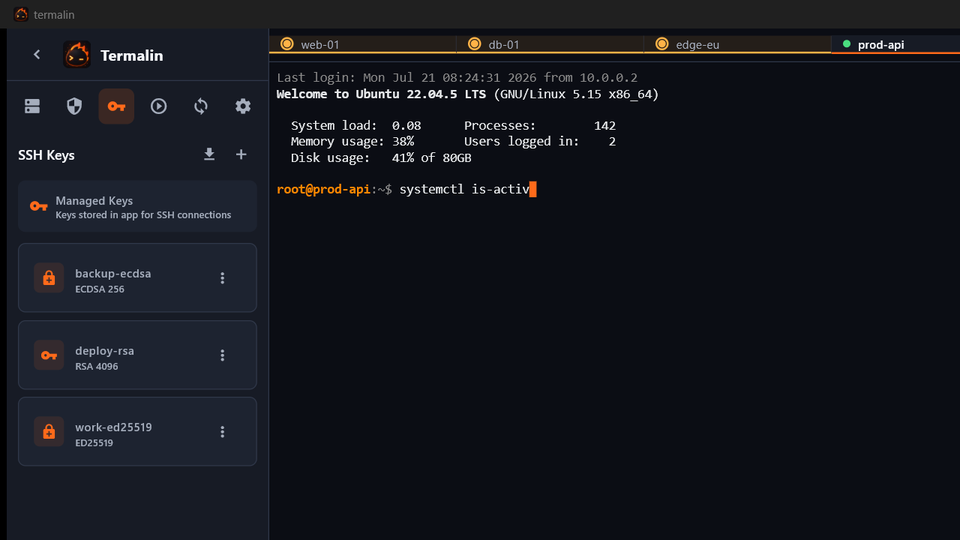
Generate and import SSH keys, view fingerprints, and let Termalin's own agent sign for you.
- Unlock once; passphrases cached on your terms.
- Keys you save in the app unlock in the key agent at once; one it can't load is listed with the reason, not hidden.
- No key ever touches disk in plaintext and no OS agent service required.
And a lot more
Port forwarding, in plain words
Reach a database or admin panel that lives behind a server, expose a local service on it, or route your traffic through it (SOCKS). You pick what you want in words — no -L/-R/-D to memorize — flip it on, and it saves per host, starts on launch and reconnects if it drops. A full SSH tunnel manager, and agents can open forwards too.
Jump hosts, one hop
Reach a server that only answers from behind a bastion: set the jump host on the host form and Termalin connects through it for you, using the jump host's saved key or password. No ProxyJump lines to hand-write, no agent gymnastics.
Search the scrollback
Hit Ctrl-F and search everything the terminal has printed — case-insensitive, with a 1/N match counter and next/previous jumps. Find the error you scrolled past without paging back through thousands of lines.
Copy, paste, the way you expect
Select to copy, right-click to paste, and Ctrl-C copies when there's a selection or sends an interrupt when there isn't — the muscle memory from PuTTY and MobaXterm, already wired. In the web terminal, dragging selects even inside full-screen programs like Claude Code, Codex or htop and copies on release; right-click for Copy screen, or Select text… to open the last 2000 lines as plain text — phones included.
Open a whole folder
Connect every host in a folder at once — one background tab each, across subfolders, connecting where saved credentials allow. Line up your prod fleet in the watch grid and drive them together.
Command history
Every command you run is kept per host — and on Pro, synced across your devices, end-to-end encrypted so only you can read it. Search it in the app or the web cabinet, and turn any line into a snippet in a click.
Browser cabinet
Sign in at termal.in/account and get a near-full client from any device — terminal with a grid view and send-to-all broadcast, SFTP/FTP/S3 file browsers, tunnels, command history, snippets and recordings. Private hosts stay reachable through the Termalin Connector, and keys never enter the browser. The same inline command suggestions work in the browser terminal too. The browser terminal, files and database client are part of Pro and Team.
Chrome extension
A Chrome extension puts a Run on server button on code blocks in ChatGPT, Claude and the docs sites you read, with a side panel for your servers, metrics and alerts and an alert badge. Signed in with your Termalin account.
More than SSH
SFTP, FTP and Telnet are first-class hosts on desktop and in the browser; RDP and VNC remote desktops open in a tab too, and Serial/COM joins them on the desktop — full serial parameters (baud, data/stop bits, parity, flow control) and auto-detected USB adapters. Same tabs and history for each; SFTP, FTP and S3 add a file browser. See the Telnet client, the RDP client and the serial terminal.
Object storage
Browse S3 and S3-compatible buckets like any other host — list, upload, download, rename and delete, keys used only for the request.
Dual-pane file manager
Two panes, drag between them — local↔host, host↔host, or to and from an S3 bucket — one drag moves files between two servers, no manual download-then-re-upload.
Terminal themes
Pick a colour scheme per host — 36 built-in themes: Termalin's own palette (the default) plus Dracula, Nord, Gruvbox, Monokai, One Dark, Material, Solarized, Catppuccin, Tokyo Night, Rosé Pine and more, dark and light both. Set a default for a whole folder or the whole app; a terminal picks its theme per host, then per folder, then your default. Works on desktop and in the web cabinet, and your choice syncs with the host. Set the terminal font size (10–20 pt) too, applied live.
Send to many hosts
Type once, run everywhere: broadcast a command to every open session and watch each one respond in the grid.
Audit log
A trail of every sign-in, host connection, file operation and agent command — plus each host, key, tunnel or snippet you create, change or remove — with where (IP · country) and which device. Filter to one device; retention scales with your plan.
Live status bar
CPU, memory, disk, network, load, uptime, processes, logged-in users and open ports for the box you're on — always current, with details on hover.
SSH key agent
Termalin's own agent signs on your behalf. Unlock once; passphrases cached on your terms, never written to disk, no OS agent service needed. It speaks the standard ssh-agent protocol, so git and your CLI can sign through it too.
Master password & locks
Encrypt everything behind one master password. Auto-lock on idle, lock on minimize, re-unlock with Windows Hello, and "remember" for as long as you choose. The lock keeps your agent and sessions running underneath — lock your screen, your AI agent keeps working — or opt to lock keys too. Set an optional recovery code as your own backstop for a forgotten password.
Encrypted cloud sync
On Pro, your hosts and keys follow you across devices — end-to-end encrypted, so we store ciphertext we can't read.
Never lose a host
Deleted hosts go to a recycle bin and are recoverable for 30 days, on desktop and web. Your encrypted vault is also versioned server-side, so an accidental overwrite can be rolled back.
Signed auto-updates
Updates are verified against a built-in key before they install — a swapped server or DNS can't push you a bad build.
Snippets & folders
Organize hosts in folders, and tag and colour-label them so a big list stays scannable. Keep your common commands a click away — any command from your history is one click from becoming a snippet, and snippets take variables prompted at run time, so you save one command and fill in the host or branch each run. On Pro, they sync both ways across devices.
In your language
The app is translated into 9 languages — English, Русский, Español, Deutsch, Français, Português, 中文, 日本語 and 한국어 — switchable in Settings.
Password generator
Need a strong password on the spot? Generate one right in the app — length and character sets your call. Your agent can call it too, over MCP.
Bring your hosts with you
Import from an SSH config, a CSV, PuTTY or MobaXterm — read PuTTY's saved sessions or MobaXterm's bookmarks, folders and all, on Windows in one click. Export any time to a backup, SSH config or CSV. No lock-in, either direction.
Cross-platform — and the browser
One client for Windows, macOS, Linux and iOS (iPhone, iPad, Apple Watch) — plus a full web cabinet at termal.in/account that runs right in the browser, phone included. A real terminal, SFTP and files on the go, no install. The web cabinet comes with Pro and Team.
Tabs & session restore
Browser-style tabs that stay alive when you switch — drag to reorder them — with scrollback restored when you reopen the app.
API keys
Connect an AI app with a key: the cabinet hands you ready-to-paste setup for Claude Code, Cursor, VS Code, Claude Desktop, Manus or curl, a Test button to check it works, and a clear reason when a key is refused. 10 keys on Pro, 25 on Team.
Rules for every AI connection
Each API key and each signed-in AI app gets a scope — which servers it may reach — and a policy: full, an allowlist of commands, or read-only. Every command lands in the audit log; output is kept only if you turn that on. A note per server tells AI apps what to be careful with.
Sign-in security
Protect your account with two-factor codes and passkeys, sign in with Google, GitHub or Apple, and link a new device before it can reach your hosts.
On your wrist and lock screen
An Apple Watch app, a home-screen widget, a Live Activity and push alerts keep your servers a glance away on iOS.
Recording storage
Cloud recordings are kept 90 days on Pro and a year on Team, in the account's cloud storage pool shared with backups — 25 GB on Pro, 100 GB on Team — with a usage bar so you can see where you stand. Recording to your own machine is free, with a retention window you choose.
Teams
Check out a Team by the seat, then add or remove members by email — every member gets Pro.
Fixed outbound address
Browser connections leave from a fixed IP you can add to a server's allow-list, so the cabinet reaches hosts that only trust known addresses.
Lifetime
A one-time offer for early backers: 100 licences, one payment from $149 — the price steps up to $199 and then $249 as they sell. See pricing.